# Switch Frame Tap
[](https://github.com/TomasUribe/switch-frame-tap/releases/latest)
[](https://github.com/TomasUribe/switch-frame-tap/releases)
[](https://www.buymeacoffee.com/papux200)
**Stream your Nintendo Switch games to your PC, with sound, at up to 1080p
60 fps, over a USB cable or your network. No capture card needed.**
Switch Frame Tap is a sysmodule (a small background program) for Switch
consoles running Atmosphère custom firmware. Install it on the SD card, open
the viewer on your PC, start a game.
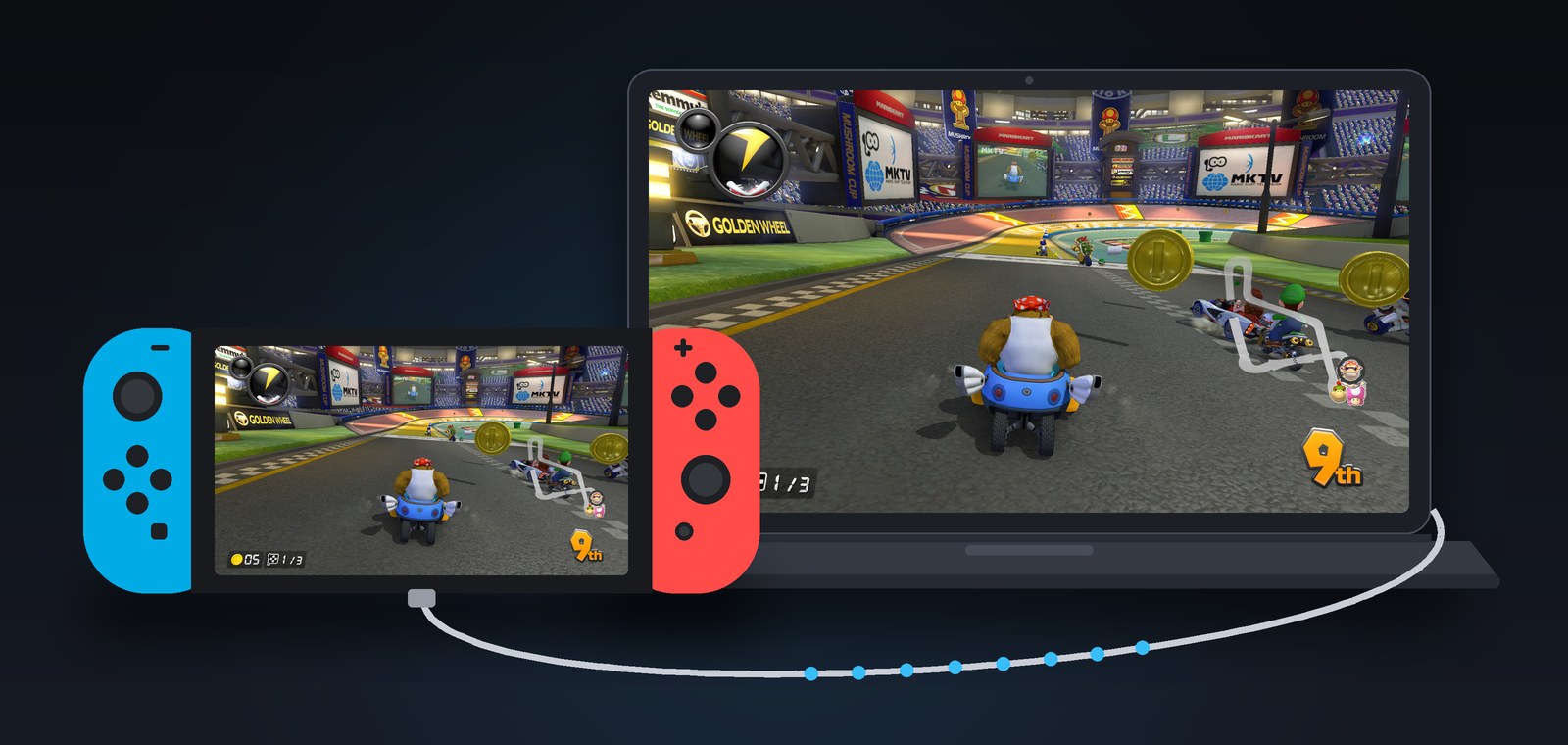
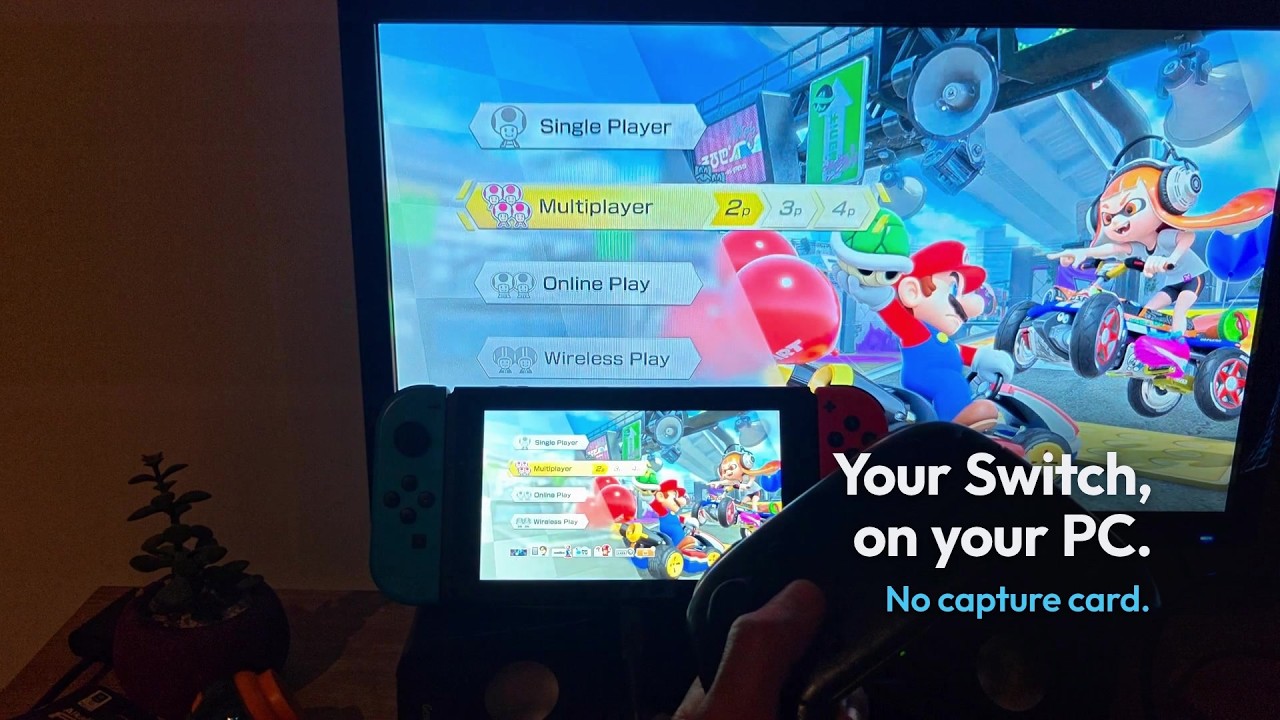
Watch the demo (1:43): connecting, the HOME menu and overlays, 1080p60, the Switch Lite, a 480 fps latency test
## Features
- **Up to 1920x1080 at 60 fps**, the game's own resolution, encoded by the
console's hardware H.264 encoder.
- **USB or network**: a USB-C cable in handheld mode, Wi-Fi or LAN when docked.
- **Game sound** included, also in games that block recording (optional).
- **Low latency**: about 45 ms (720p) to 60 ms (1080p) from the game to your PC.
- **Viewers for Windows, Linux, macOS and Android / Android TV**, with one Settings panel for everything.
- **The HOME menu and the console's overlays** can stream too (opt-in): the
volume bar, the quick settings, the power menu and Tesla / Ultrahand menus
on top of the game.
- **Updates from the apps**: the Switch app, the PC viewers and the Android
app check GitHub and update themselves.
- **Record to MP4** with one key, and take **native-resolution screenshots**.
- **Webcam mode**: the Switch shows up as a USB camera in OBS, Discord, Zoom
or any camera app.
- **Optional GPU upscaling** in the viewer (AMD FSR 1, NVIDIA NIS, RTX Video
Super Resolution on Windows).
- **Screen off while streaming**, to save battery when you play on the PC.
- **A Switch app and an overlay** for every setting, so you never have to edit
files.
## What you need
- A Switch running [Atmosphère](https://github.com/Atmosphere-NX/Atmosphere/releases)
(firmware 21 to 23; tested on 22.5.0 with Atmosphère 1.11.2, users run 23.0.0 and 23.0.1 with 1.12)
- A PC with Windows 10/11, Linux or macOS 12+ - or an Android / Android TV
device (Android 6+, over the network)
- A USB-C to USB-A cable, or the Switch and the PC on the same network
## Quick start
1. Download the `-switch.zip` from the
**[latest release](https://github.com/TomasUribe/switch-frame-tap/releases/latest)**
(or get it from the Homebrew App Store), unzip it onto the root of the SD
card and reboot.
2. Download the viewer for your PC from the same release:
- **Windows:** unzip it and install the USB driver once with
[Zadig](https://zadig.akeo.ie/) ([how](#install)), then open `SwitchFrameTap.exe`.
- **Linux:** unpack it and run the install script ([how](#install)).
- **macOS:** unzip it, drag the app to Applications, right-click it and choose **Open**.
- **Android / Android TV:** install the `-android.apk` with a file manager
that can install apps, and set the Switch's Connection to **Network**.
3. Plug the Switch into the PC (handheld), open the viewer and start a game.
To stream over the network instead (to play docked, or to a TV with the
Android app), set
**Connection** to **Network** in the Switch app, restart the console, and
pick **Network** in the viewer (**Tab**).
After that, the apps keep themselves up to date: the Switch app's **Updates**
page and the viewers' **Update** button install new versions from GitHub.
The full guide, with every option, is in [Install](#install).
## Good to know
- **USB only works in handheld mode**, because the dock uses the USB port.
When docked, stream over the network.
- **1080p over USB** needs [ReverseNX-RT](https://github.com/masagrator/ReverseNX-RT)
to make the game render its docked picture in handheld; docked over the
network it is 1080p by itself.
- **It starts about 30 seconds after the console boots**, once the HOME menu
is up, so it never takes memory the system needs while booting.
- **Running many sysmodules?** They all share a few MB of system memory. If
the others leave too little, Switch Frame Tap simply does not start (the
console boots normally); the Switch app's **Setup** page (System memory)
says how much each sysmodule uses.
- **The HOME menu and the overlays** (volume bar, quick settings, power menu,
Tesla / Ultrahand) stream only if you turn them on, on the app's **Beta**
page; with them off it streams exactly as before.
- **It is experimental homebrew**, tested on a few consoles and games. Read
[Limitations](#limitations) before installing it.
## Support
If you like the project and want to support it, you can
[buy me a coffee](https://www.buymeacoffee.com/papux200). Thank you!
[](https://www.buymeacoffee.com/papux200)
---
## In detail
**The goal of this project is 1080p at 60 fps**: the game's native docked
resolution, at full frame rate, on any PC.
**Where it is today: 1080p60 works.** Over a plain USB cable it streams
**native 1920x1080 at the game's 60 fps** whenever the game renders 1080p, and
the console's native 1280x720 at 60 fps in ordinary handheld mode. The USB
port is only free in handheld, so 1080p over USB uses
[ReverseNX-RT](https://github.com/masagrator/ReverseNX-RT) to make the game
render its docked picture in handheld (Run W: 59.5-59.9 fps sent per 20 s
window against the game's ~59.2, 0 errors). See
[the road to 1080p60](#the-road-to-1080p60) for what is left.
> **It works, and it is playable.** Live mode streams whenever a viewer
> (Windows, Linux, macOS or Android) is open and a game is running - with its sound -
> reattaches by itself when you close the viewer, close the game or start
> another one, and has been played with Mario Kart 8 Deluxe (60 fps), Zelda:
> Breath of the Wild and Ocarina of Time on Nintendo Switch Online (30 fps),
> and homebrew apps started from HOME-menu forwarders. **0 frames lost, 0
> undecodable, 0 stale or torn frames** in the measured runs; about **45 ms**
> (720p) to **60 ms** (1080p) from the game presenting a frame to it being on
> the PC screen (monitor not included).
>
> Since v0.7.0 it also streams **over the network** - Wi-Fi or the dock's
> LAN port - so a docked console streams its native 1080p too, with the
> quality adapting to what the network carries.
>
> Since v0.7.14 it can also stream **the HOME menu and the system screens**,
> and put **the console's overlays** (the volume bar, the quick settings, the
> power menu, Tesla / Ultrahand) on top of the game - both opt-in.
>
> It is still **experimental**: tested on the author's console and by users on
> theirs (a Switch Lite, firmware 21 to 23). Read [Limitations](#limitations)
> before installing it.
| | |
|---|---|
|  |  |
|  |  |
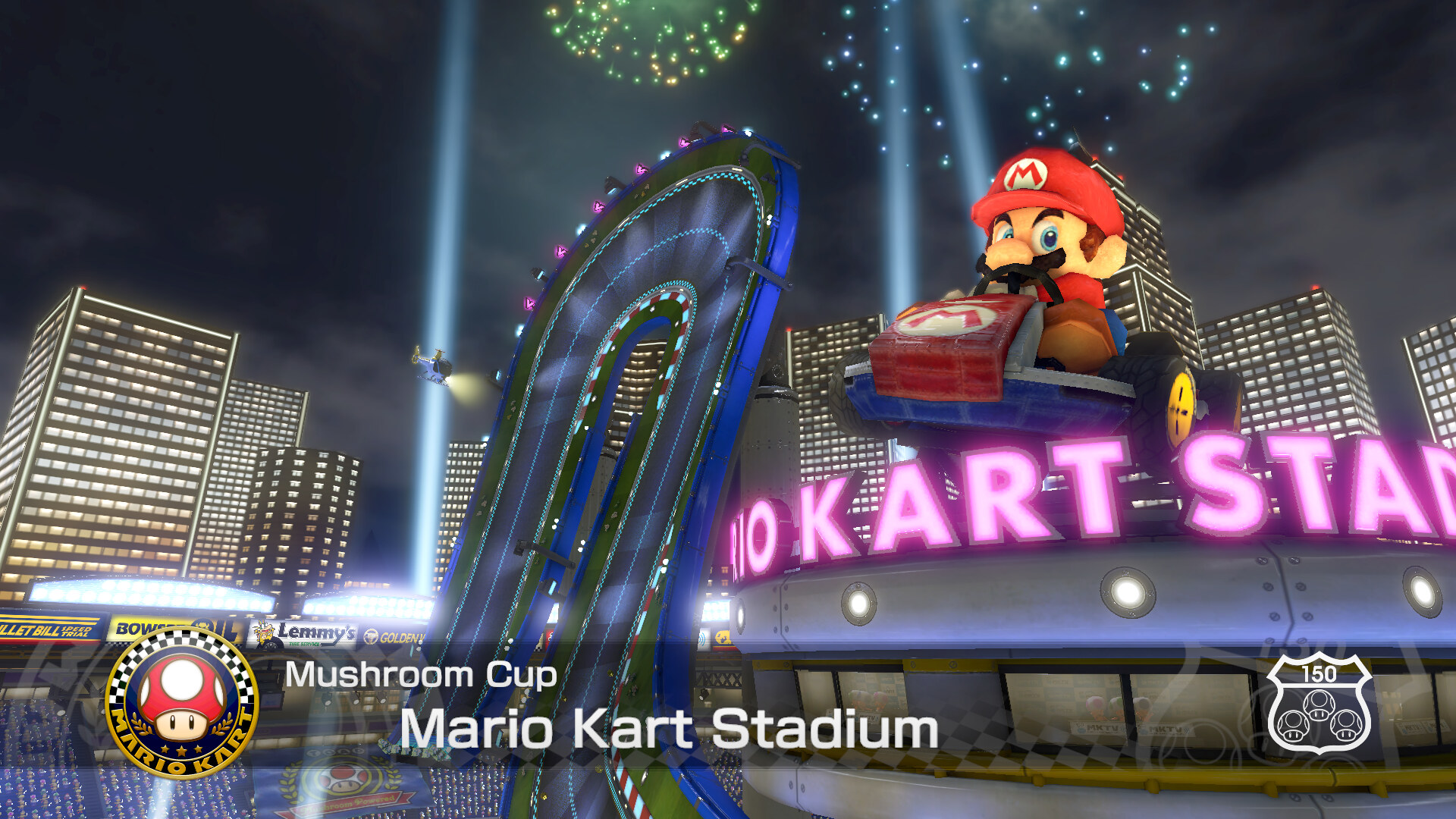
*Screenshots taken on the console with the screenshot button (L3 + R3), at
the game's own resolution: Mario Kart 8 Deluxe at 1920x1080 (docked picture
through ReverseNX-RT, in handheld), Ocarina of Time on Nintendo Switch Online
at 1280x720 - the same frames the stream sends.*

*Recorded with the viewer's **R** key (v0.5.0): Mario Kart 8 Deluxe at native
1920x1080, 60 fps (the docked picture through ReverseNX-RT, in handheld). The
animation is 4 seconds of it scaled down; **[the whole 30-second recording](https://github.com/TomasUribe/switch-frame-tap/releases/download/v0.5.0/switch-frame-tap-sample-mk8-race-1080p60.mp4)**
(381 MB, 1080p60 with sound) is the file exactly as the viewer saved it - the
console's own H.264, never re-encoded: 1792 frames, 59.3 fps, 0 decode errors.*
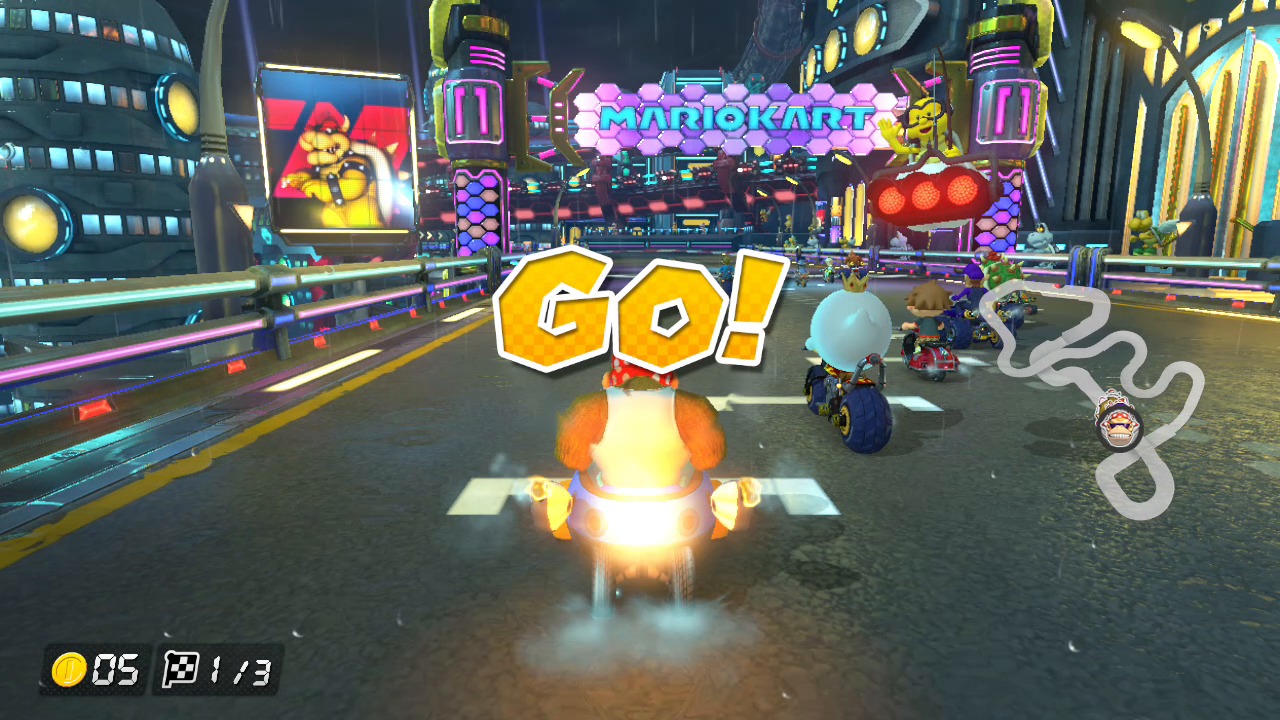
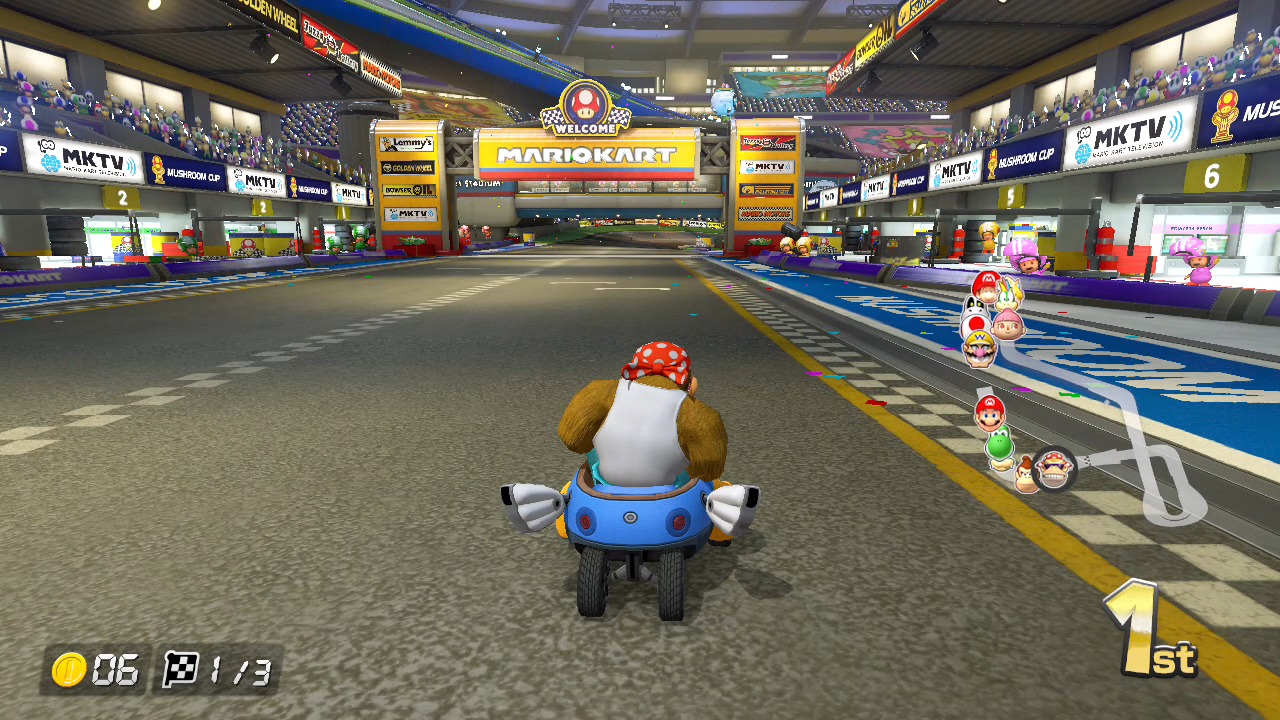
*A frame off the live stream, decoded on the PC from the console's own H.264
(Run M, live mode). [A 6.7 s clip of the stream](docs/stream-mk8-title-60fps.mp4)
is the console's bitstream exactly as it arrived over USB, only put in an MP4
container: 60 fps, keyframe every 60 frames. Below, the same clip as a small
animation.*

| | measured |
|---|---|
| Resolution / frame rate | **1920x1080** when the game renders it (docked picture via ReverseNX-RT): MK8D 58.4 fps over a session, 59.5-59.9 per window; 1280x720 native handheld: MK8D 57-59 fps, BOTW 29 fps |
| Transport | USB 2.0 bulk, the Switch's own USB-C port, no dock; or TCP over Wi-Fi / the dock's LAN port (v0.7.0), the quality adapting to the link |
| Audio | the game's sound, 48 kHz stereo PCM, from the console's own recorder (grc:d); ~1.5 Mbps alongside the video |
| Video | H.264 from the Switch's NVENC, constant QP 20 (P frames 22, v0.6.0), keyframe every 60 frames; 1080p ~80 Mbps in a fast race, 720p about half; the manager's Medium / Low quality roughly half / a third of that |
| Latency | 720p: ~20-23 ms on the console (game present -> sent) + ~21-24 ms on the PC (arrival -> on screen); 1080p: ~34 + ~25 ms |
| Reliability | 0 lost / 0 undecodable frames in every run since M84; 0 stale or torn frames (M89) |
| Console | Mariko, firmware 22.5.0, Atmosphère 1.11.2 (the author's); users report a Switch Lite on 23.0.0 with Atmosphère 1.12.0 |
For comparison, [SysDVR](https://github.com/exelix11/SysDVR), the established
tool, is capped at 720p30 for game video, because it reads the system's own
game-recording encoder, whose settings are fixed in firmware. This project
takes the frame before that encoder.
## How it works
```
the game presents a frame (queueBuffer)
| vi:u mitm (games) / vi:m mitm (homebrew) sees it: which swapchain slot,
| and the GPU fence for it
v
take the newest frame the GPU has finished (or wait for the next one)
v
svcReadDebugProcessMemory: copy the slot out of the game's memory
| (the kernel debug SVCs - the only route to another process's pixels)
v
VIC: RGBA block-linear -> BT.709 NV12 (the Tegra's video compositor)
v
NVENC: H.264, IDR + P frames (the job the system's own recorder builds)
v
USB bulk or TCP -> the viewer (Windows / Linux / macOS: libusb + libavcodec + SDL2;
Android: MediaCodec)
grc:d (the console's own recorder): the game's sound, 48 kHz stereo PCM
-> the same USB stream, a packet before each frame -> played in step
```
The sysmodule never touches the GPU or the display stack's buffers directly.
It watches the game's display traffic through a `vi:u` mitm (and homebrew's
through `vi:m`, for the running application only), reads the
finished frame with the same debug SVCs Atmosphère's cheat engine uses, and
drives the VIC and NVENC engines itself over raw `nvdrv` ioctls. The sound
comes from `grc:d`, the recorder behind the console's own video clips.
With the betas on (v0.7.14), the same pipeline streams **the HOME menu** - its
frames come from `vi`'s own layers when no game is on screen, and the Album's
through a `dispdrv` mitm - and **the overlays**: the volume bar, the quick
settings and the power menu are read from `overlayDisp`'s memory, Tesla /
Ultrahand's from its own process, and the VIC blends them over the game as
extra input slots in the job that already converts each frame. The system's
overlays are copied only when their picture has stayed put for 5 ms, so a frame
caught mid-draw never reaches the stream; Tesla's presents say when its
picture is finished.
## What you need
**Required** - enough to stream at 720p60, take screenshots and use the
manager app:
| | |
|---|---|
| A Switch running **Atmosphère** custom firmware | [Atmosphère releases](https://github.com/Atmosphere-NX/Atmosphere/releases) - tested with 1.11.2 on firmware 22.5.0 (Mariko); users report 23.0.0 (Atmosphère 1.12.0, since v0.7.11), 22.0.0 (Atmosphère 1.11.1) and 21.0.1 working. New to custom firmware: the [NH Switch Guide](https://switch.hacks.guide/). Keep a NAND backup. |
| The **homebrew menu** | Comes with Atmosphère (`hbmenu.nro`); also [nx-hbmenu releases](https://github.com/switchbrew/nx-hbmenu/releases). It opens the manager app. |
| A **PC or an Android device** | Windows 10/11: the viewer zip, plus the WinUSB driver installed once with [Zadig](https://zadig.akeo.ie/). Linux: one program with everything built in, or build it with one `apt install` line. macOS 12+: the app. Android 6+ / Android TV: the APK, over the network. All [below](#install). In [webcam mode](#webcam-mode), no viewer or driver: OBS reads it as a camera. |
| A **USB-C cable**, or a **network** | USB 2.0 is plenty; over USB the Switch stays in handheld (the dock owns the port). Use a **USB-C to USB-A** cable into a USB-A port: with a USB-C to USB-C cable the Switch can take the host role, as it does for a controller, and the PC never sees it. [Network streaming](#network-streaming-play-docked) needs no cable and works docked: Wi-Fi or the dock's LAN port, the PC on the same network. |
**Optional** - one per feature. Since v0.7.5 the manager app's **Get extras**
installs each of them from its author's GitHub release (see
[below](#get-extras)); or download them yourself from the links:
| for | install | notes |
|---|---|---|
| **The overlay** (stream on/off, "Stream this app", the beta switches and handheld/docked from inside a game) | an overlay menu: [Ultrahand Overlay](https://github.com/ppkantorski/Ultrahand-Overlay/releases) (its `sdout.zip` includes the loader, nx-ovlloader), **or** [Tesla Menu](https://github.com/WerWolv/Tesla-Menu/releases) with [nx-ovlloader](https://github.com/WerWolv/nx-ovlloader/releases) | Without one, everything is still in the manager app except handheld/docked. |
| **1080p** over USB in handheld (docked over the network is 1080p by itself) | [SaltyNX](https://github.com/masagrator/SaltyNX/releases) and [ReverseNX-RT](https://github.com/masagrator/ReverseNX-RT/releases) (tested: SaltyNX 2.0.0) | ReverseNX-RT makes the game render its docked (1080p) picture in handheld; it needs an overlay menu too. Official games only. |
| **1080p at a full 60 fps** | a clock tool: [sys-clk](https://github.com/retronx-team/sys-clk/releases) or [Horizon OC](https://github.com/Horizon-OC/Horizon-OC) | CPU 1785 MHz (Nintendo's boost clock). At the stock clock 1080p runs a little below 60. |
| **Screenshot notifications** | [Ultrahand Overlay](https://github.com/ppkantorski/Ultrahand-Overlay/releases) | Screenshots work without it; Ultrahand only shows the "Screenshot saved" toast. |
| **Sound in games that block recording** (Smash) | nothing - [dvr-patches](https://github.com/exelix11/dvr-patches) come bundled, off | Turn on **Sound in no-record games** in the manager or the overlay and restart ([below](#sound-in-games-that-block-recording)). |
Nothing else: no other sysmodule, no sigpatches, no capture card.
## Install
This drives hardware engines directly; a bug can freeze the console (see
[If something goes wrong](#if-something-goes-wrong)).
**1. The Switch.** Download `switch-frame-tap--switch.zip` from the
[latest release](https://github.com/TomasUribe/switch-frame-tap/releases/latest) and unzip
it onto the root of the SD card (card reader or Hekate USB mass storage). It
contains:
```
atmosphere/contents/0100000000000C20/ the sysmodule
atmosphere/contents/0100000000000C21/ its launcher and memory helper (starts at boot)
switch/switch-frame-tap/switch-frame-tap.nro the manager app (homebrew menu)
switch/.overlays/switch-frame-tap.ovl the overlay (Tesla / Ultrahand)
```
Reboot. The sysmodule starts about 30 seconds after boot, once the HOME menu
is up. Updating later: the app's **Updates** page does it for you (or unzip a
new release over it; your settings are kept either way).
**2a. The PC viewer on Windows.** Unzip
`switch-frame-tap--windows-viewer.zip` anywhere (a folder you can
write to, so it can update itself). Once, with the Switch
connected and running: open [Zadig](https://zadig.akeo.ie/), **Options ->
List All Devices**, pick **Switch Frame Tap** (USB ID 1209 5F1E - make sure
it is that one), choose **WinUSB** and **Install Driver**. Then double-click
`SwitchFrameTap.exe` (keep the DLLs next to it; the zip is 2 MB). Windows may warn about an
unknown publisher: **More info -> Run anyway**.
**2b. The PC viewer on Linux** (any distribution - Ubuntu, Fedora, Arch,
Bazzite, SteamOS - x86_64). Unpack `switch-frame-tap--linux.tar.gz` and
run `./install.sh`: it puts **Switch Frame Tap** in the applications menu and
prints the one `sudo` command that installs the USB rule (lets the viewer open
the Switch). It is a single program with FFmpeg, SDL 2 and libusb built in.
`./install.sh --remove` uninstalls it.
Or, without installing anything, the **AppImage**
`switch-frame-tap--linux-x86_64.AppImage`: make it executable
(`chmod +x`, or the file's Properties) and double-click it. It updates itself
like the other viewers. Or the **Flatpak bundle**
`switch-frame-tap--linux.flatpak`: `flatpak install --user
switch-frame-tap--linux.flatpak` (its runtime comes from Flathub). For
USB, both need the USB rule once:
```bash
curl -fsSL https://raw.githubusercontent.com/TomasUribe/switch-frame-tap/master/tools/raw-recv/99-switch-frame-tap.rules | sudo tee /etc/udev/rules.d/99-switch-frame-tap.rules && sudo udevadm control --reload-rules && sudo udevadm trigger
```
On **KDE Plasma** the viewer uses the session's Wayland driver when there is
one (the old XWayland path could freeze the window on a high-refresh desktop).
Its log is `$XDG_STATE_HOME/switch-frame-tap/viewer.log` (normally
`~/.local/state/switch-frame-tap/viewer.log`); `switch-frame-tap-viewer --check`
prints the session, video and audio drivers, the udev rule, the USB devices and
the network state. If Wayland itself misbehaves, start it once with
`SDL_VIDEODRIVER=x11 switch-frame-tap-viewer --app`.
For USB the PC must see **`1209:5f1e` "Switch Frame Tap"** (`lsusb -d
1209:5f1e`). If it shows **`18d1:4ee0` "SysDVR"**, SysDVR still owns the
console's USB gadget: remove or disable it on the SD card and reboot. The
viewer now names it on its home screen.
To build it from source instead (Ubuntu/Debian):
```bash
sudo apt install build-essential libusb-1.0-0-dev libsdl2-dev libavcodec-dev libavutil-dev libavformat-dev
sudo cp tools/raw-recv/99-switch-frame-tap.rules /etc/udev/rules.d/
sudo udevadm control --reload-rules && sudo udevadm trigger
bash tools/raw-recv/install-launcher.sh
```
**2c. The PC viewer on macOS** (v0.7.11; Apple Silicon or Intel). Unzip
`switch-frame-tap--macos-arm64.zip` (Apple Silicon) or `-x86_64.zip`
(Intel) and drag **Switch Frame Tap.app** to Applications. It is not signed by
Apple: the first time, right-click it and choose **Open**. No USB driver is
needed. Thanks to proconsule54 and DiM3NT0R for the first macOS builds.
**2d. Android and Android TV** (v0.7.14; Android 6 or newer - Android TV,
Google TV, phones, tablets). Install `switch-frame-tap--android.apk`
with a file manager that can install apps (Android asks once to allow it). It
plays the stream over the network (set the Switch's Connection to Network) or
USB, with sound. Made by didix16.
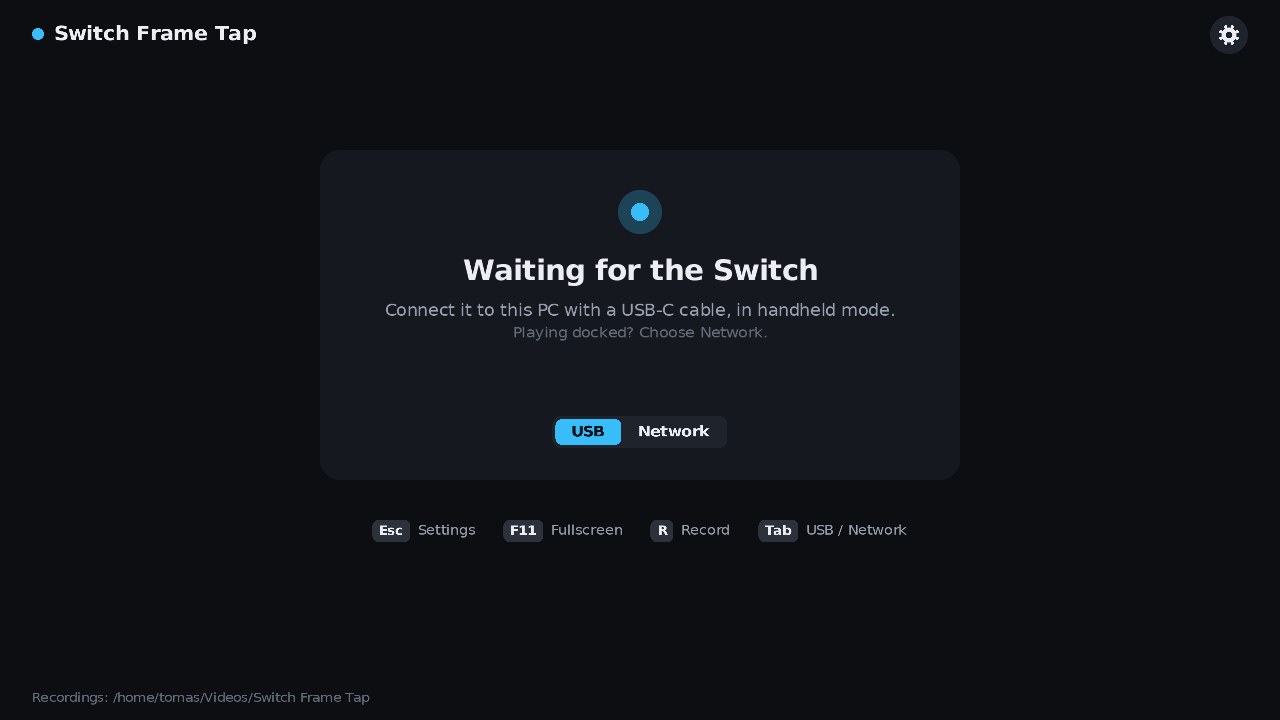
On all of them, the viewer opens a window that says what it is waiting for (the
Switch, its USB driver, or a game) and lists its keys; the same screen comes
back whenever the game is closed or not on screen (the HOME menu) instead of
a frozen frame. It reconnects on its own and closes only when you close it. It plays the game's sound on the
default audio device.
|  |  |
|---|---|
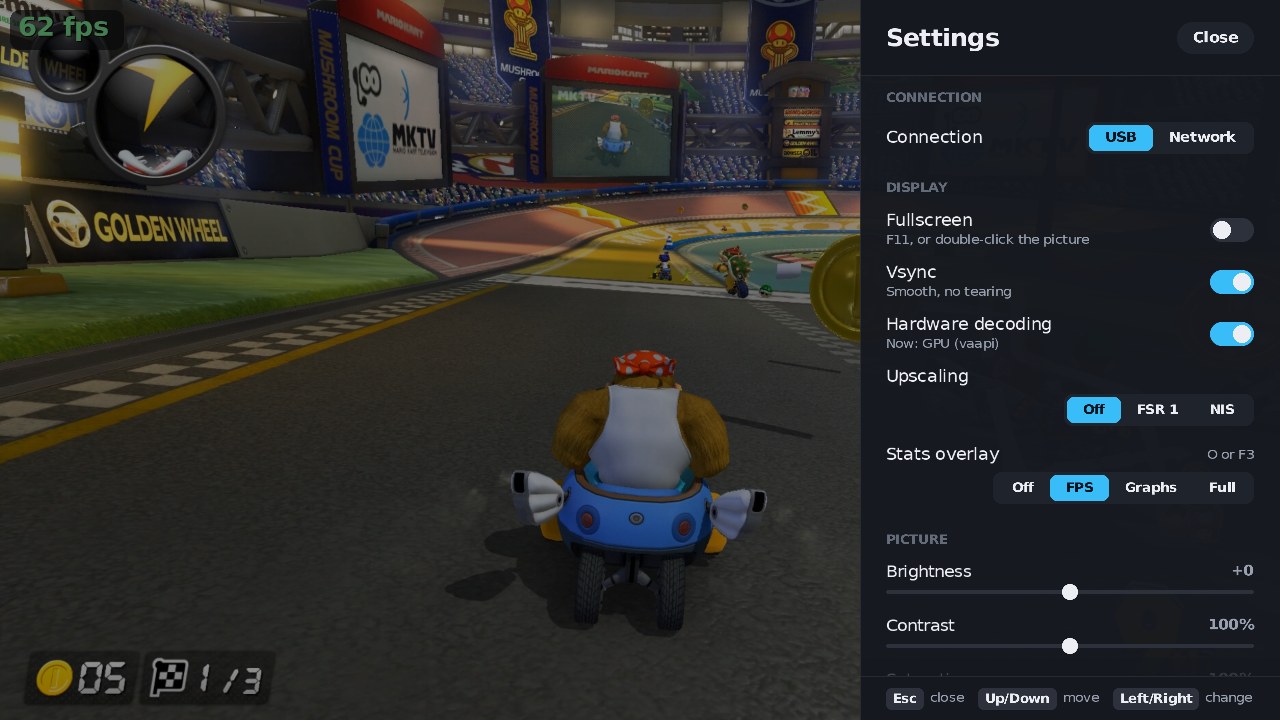
| *The home screen: what the viewer is waiting for, USB or network* | *Settings (Esc or the gear): every option, mouse or keys* |
| 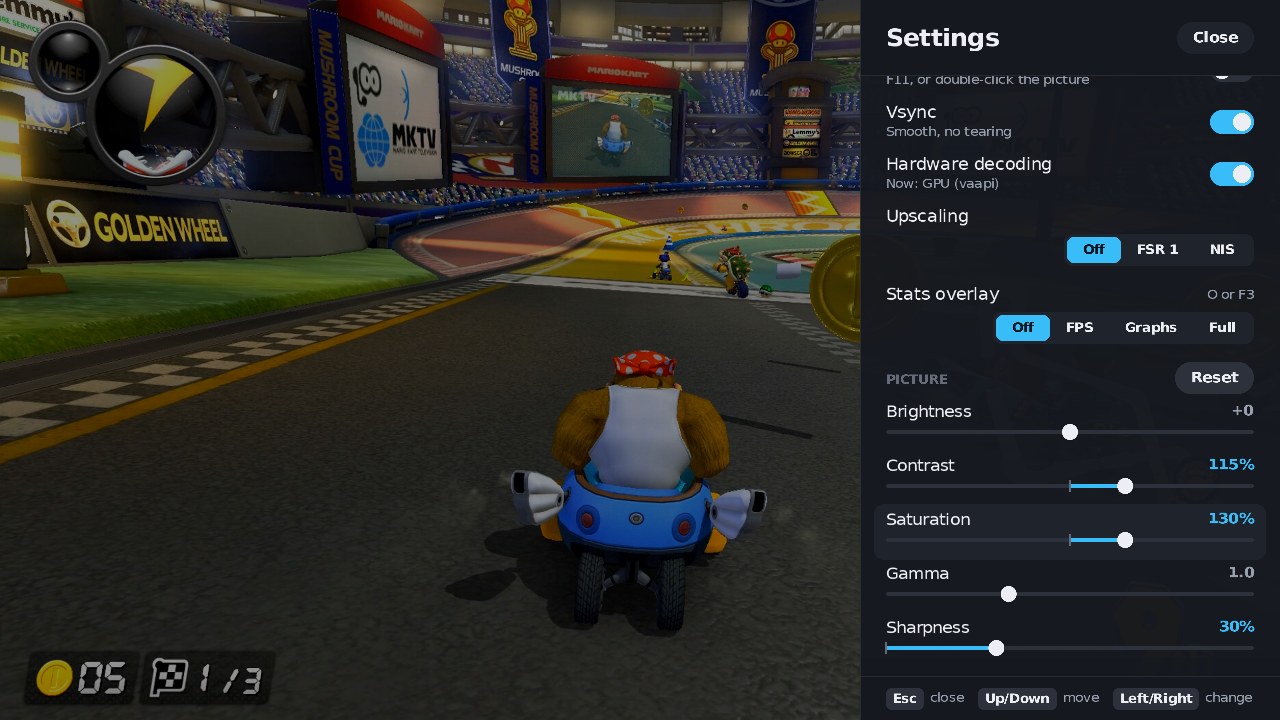 |  |
| *Picture controls (P)* | *The full stats overlay (O / F3) and the recording timer (R)* |
| key | |
|---|---|
| **R** | record / stop recording (below) |
| **M** | mute / unmute the game's sound |
| **F11** or a double-click | fullscreen |
| **Esc** | Settings (v0.7.12): every option in one place - connection, display, upscaling, decoding, picture, sound, recording - with the mouse or the arrow keys |
| **Tab** | the connection: USB / Network (v0.7.0; remembered) |
| **I** | type the Switch's IP address (Network, if it is not found by itself) |
| **O** or **F3** | the stats overlay: off / FPS / graphs / full (v0.7.2; remembered) |
| **V** | vsync on / off - off is lower latency but may tear (v0.7.11; remembered) |
| **U** | GPU upscaling: off / AMD FSR 1 / NVIDIA NIS, plus NVIDIA RTX Video Super Resolution on Windows (v0.7.11; remembered, off by default) |
| **P** | Settings at the picture controls: brightness, contrast, saturation, gamma, sharpness (v0.7.12; remembered) |
It reads USB, decodes and draws on separate threads and shows the frames in
order, one per screen refresh (vsync), so the picture stays smooth. Its
statistics - frame rate, latencies, decode and draw times, once a second - go
to the terminal, and to `$XDG_STATE_HOME/switch-frame-tap/viewer.log`
(normally `~/.local/state/switch-frame-tap/viewer.log`) for the desktop
launcher on Linux, and to `%APPDATA%\switch-frame-tap\viewer\viewer.log` on
Windows.
**Hardware decoding** (v0.7.12): the viewer decodes with the graphics card's
video decoder - about 5 ms less latency in busy scenes and no keyframe
stutter - and falls back to the CPU by itself. On by default on Linux (VAAPI
for AMD and Intel, the Steam Deck included, or NVDEC for NVIDIA - since v0.7.13
also in the ready-made Linux download, which loads the system's libva only if
it is there) and, since v0.7.13, on Windows (D3D11VA). On macOS (VideoToolbox)
it is still being tested, so it is off by default there - turn it on in
Settings and tell us how it goes. `--software` (or `hwdec=0` in viewer.ini)
decodes on the CPU.
**GPU upscaling** (v0.7.11, off by default): when the window or fullscreen is
bigger than the stream (say 1080p shown on a 1440p or 4K monitor), **U**
sharpens the enlargement on your graphics card instead of a plain stretch.
**FSR 1** (AMD FidelityFX Super Resolution) works on any GPU with OpenGL 4.3;
**NIS** (NVIDIA Image Scaling) too, despite the name; on macOS, FSR 1 runs
on Metal (since v0.7.13, DiM3NT0R's PR #14); on Windows, **RTX VSR**
uses an RTX card's own AI upscaler (turn on *RTX Video Enhancement - Super
resolution* in the NVIDIA app or Control Panel; it costs a few milliseconds
of latency). Recordings and screenshots keep the console's own picture.
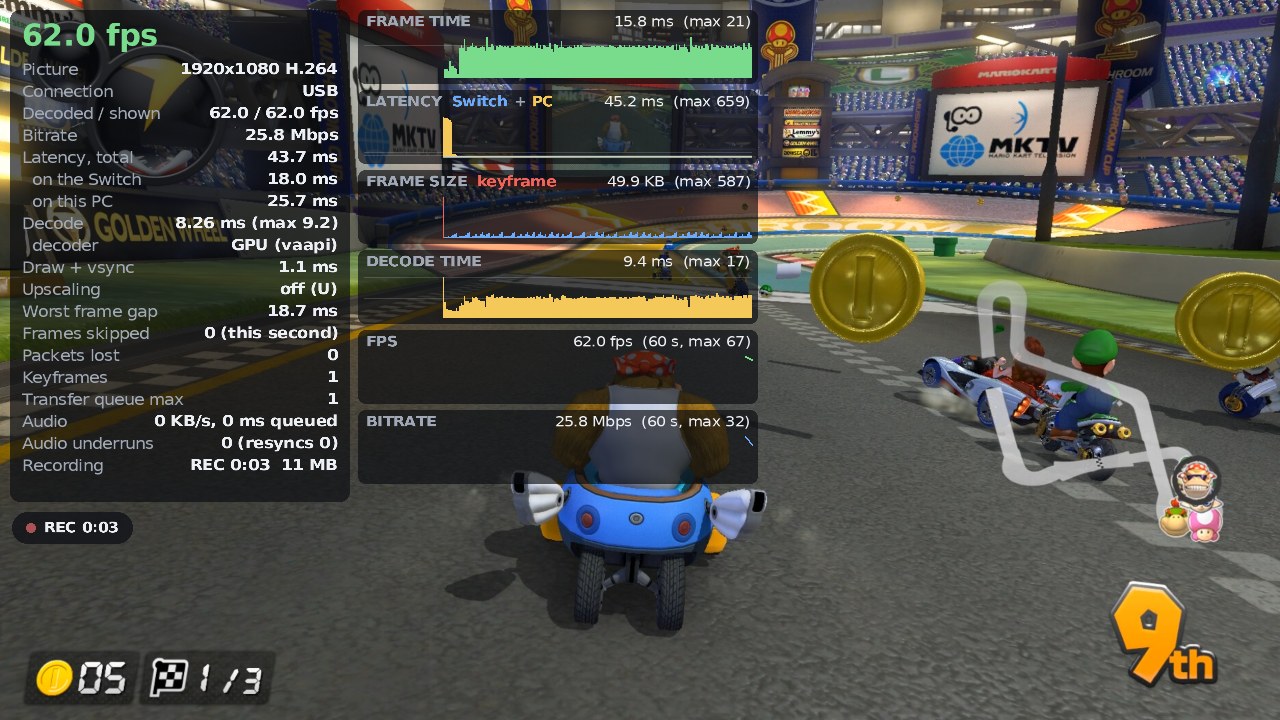
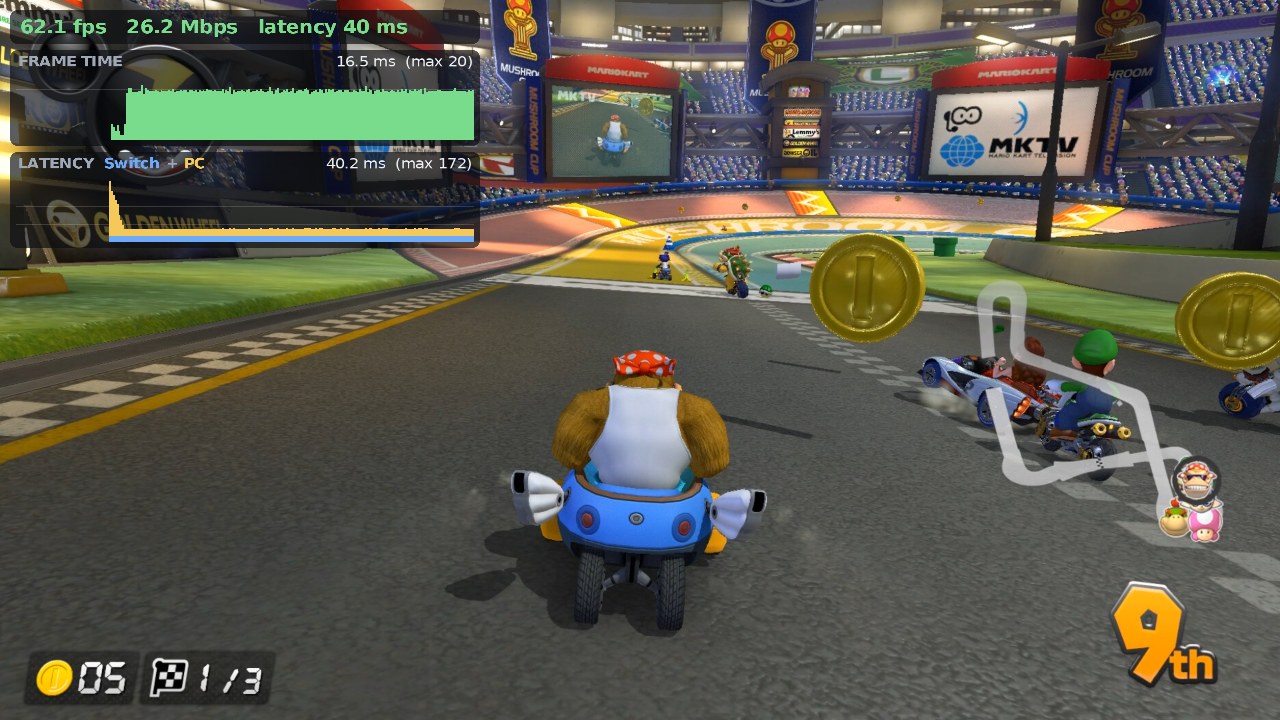
**The stats overlay** (v0.7.2): **O** or **F3** steps through four levels -
off; **FPS**, a counter in the corner (yellow or red when frames come
unevenly); **graphs**, frame rate, bitrate and latency with a frame-time graph
and a latency graph split into the Switch's part and the PC's; and **full**,
every number the viewer keeps (decode and draw times, skipped frames, lost
packets, keyframes, the audio buffer, ...) with six graphs. It scales with the
window, and the level is remembered.
|  |  |
|---|---|
**Recording (v0.5.0).** Press **R** in the viewer: from the next keyframe (within
a second) it saves an MP4 to `Videos/Switch Frame Tap` - the console's H.264
exactly as it arrived, never re-encoded, so no quality is lost and it costs
almost no CPU, plus the game's sound (AAC). **R** again stops. A red dot
shows while it records, and the title bar the time and size. At 1080p it is
about 10 MB a second (~600 MB a minute) at High quality, half that at Medium. The file is written in fragments, so
a recording cut short by closing the window or pulling the cable still plays;
if the game switches between 720p and 1080p mid-recording it continues in a
new file - or, with **One file per recording** on (Settings, also in the
Android app), the console keeps the size the recording started at and scales
other sizes to it, so it stays one file (scaled pictures look a little softer);
it will not start with less than 1 GB free and stops by itself below 500 MB.
**3. Stream.** Connect the Switch (handheld) to the PC with the USB-C cable,
open the viewer and start a game. The picture appears a few seconds after the
game is on screen (the sysmodule starts about 30 s after boot; with **Stream
the HOME menu** on, the HOME menu streams from then on too). Close the viewer or the
game whenever you like; the stream picks up again when both are back.
**1080p.** Install [SaltyNX and ReverseNX-RT](https://github.com/masagrator/ReverseNX-RT)
and pick **Docked (1080p)** in the Switch Frame Tap overlay (or ReverseNX-RT's
own): the game renders its docked picture and the stream switches to
1920x1080 by itself. 1080p60 wants **CPU 1785 MHz** (Nintendo's own boost
clock; GPU 768 / RAM 1600, the docked values) from a clock tool such as
Horizon OC or sys-clk. At the stock handheld clocks (CPU 1020, RAM 1331) a
heavy game streams far below 60 at 1080p - Mario Kart 8 about 25 fps - since
each 1080p frame takes ~18 ms to read; light games keep up.
Expect more heat and battery drain, and some games dislike fake docked mode
(MK8D crashes with Joy-Cons attached; use a Pro Controller).
**Homebrew at 1080p (beta).** ReverseNX-RT is for official games. On the app's
**Beta** page (or in the overlay), **Homebrew in docked mode** tells homebrew
started by holding R over a game, or from a forwarder on the HOME menu, that
the console is docked, so apps that pick their resolution from that (SDL2
ports, emulators) draw and stream at 1080p. Not from the Album: homebrew there
has too little memory for 1080p. Forwarders with a Nintendo-style title id
(0100...) look like games and are left alone.
### The manager app
| | |
|---|---|
|  |  |
| 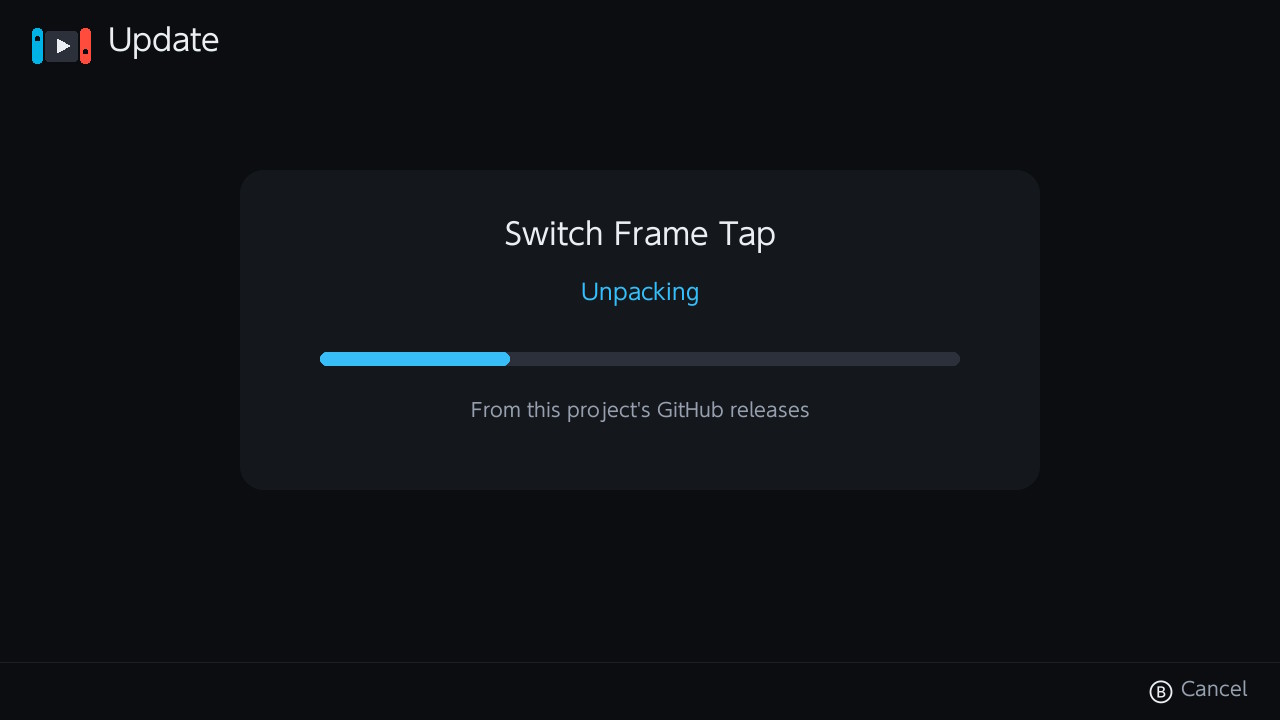 | 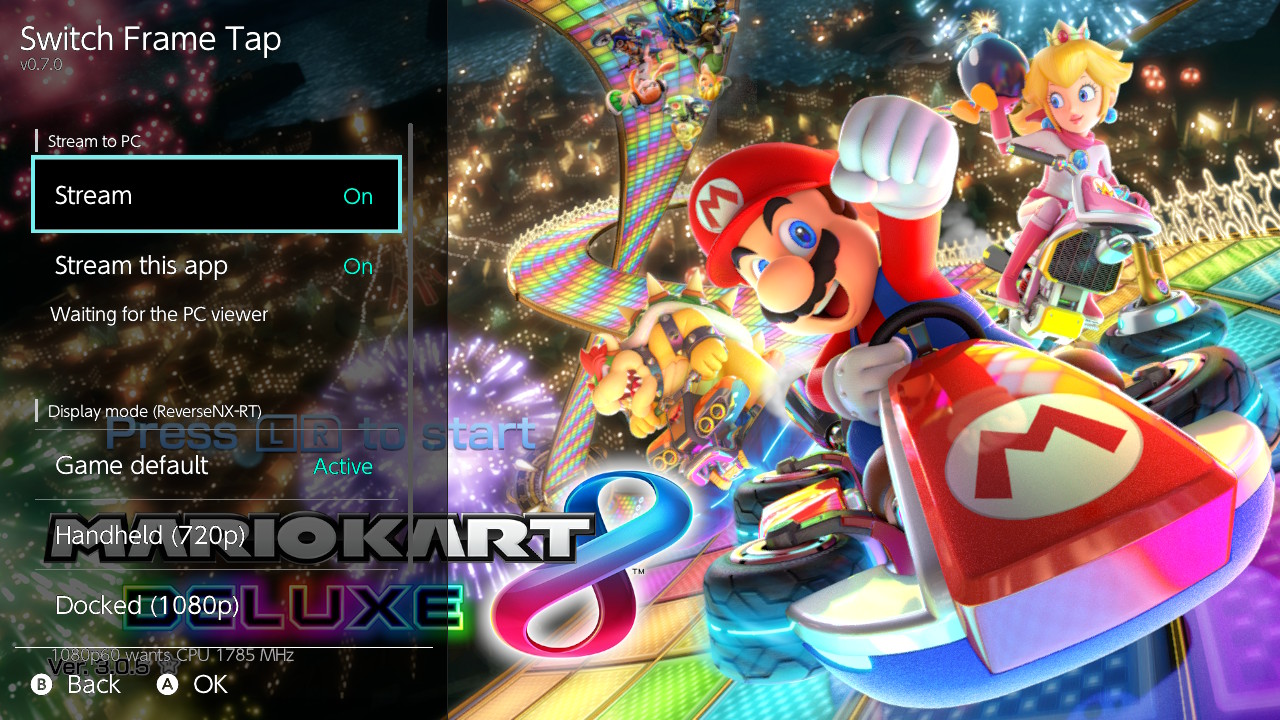 |
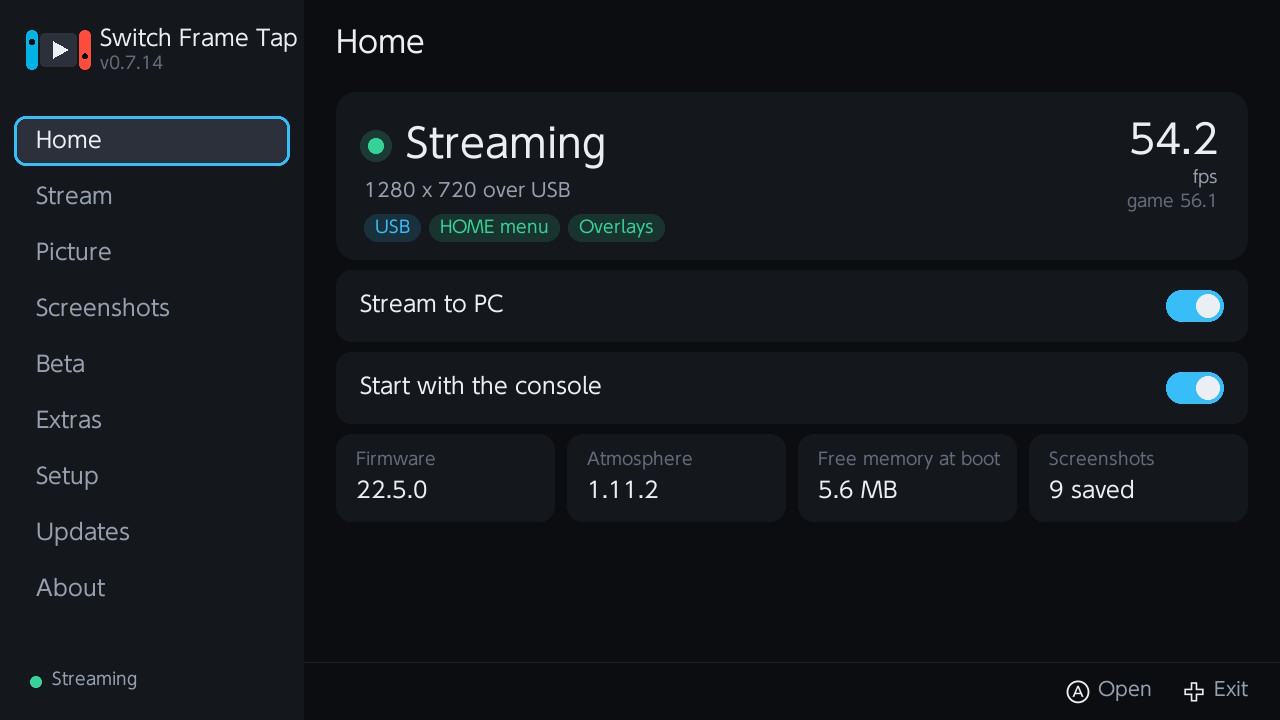
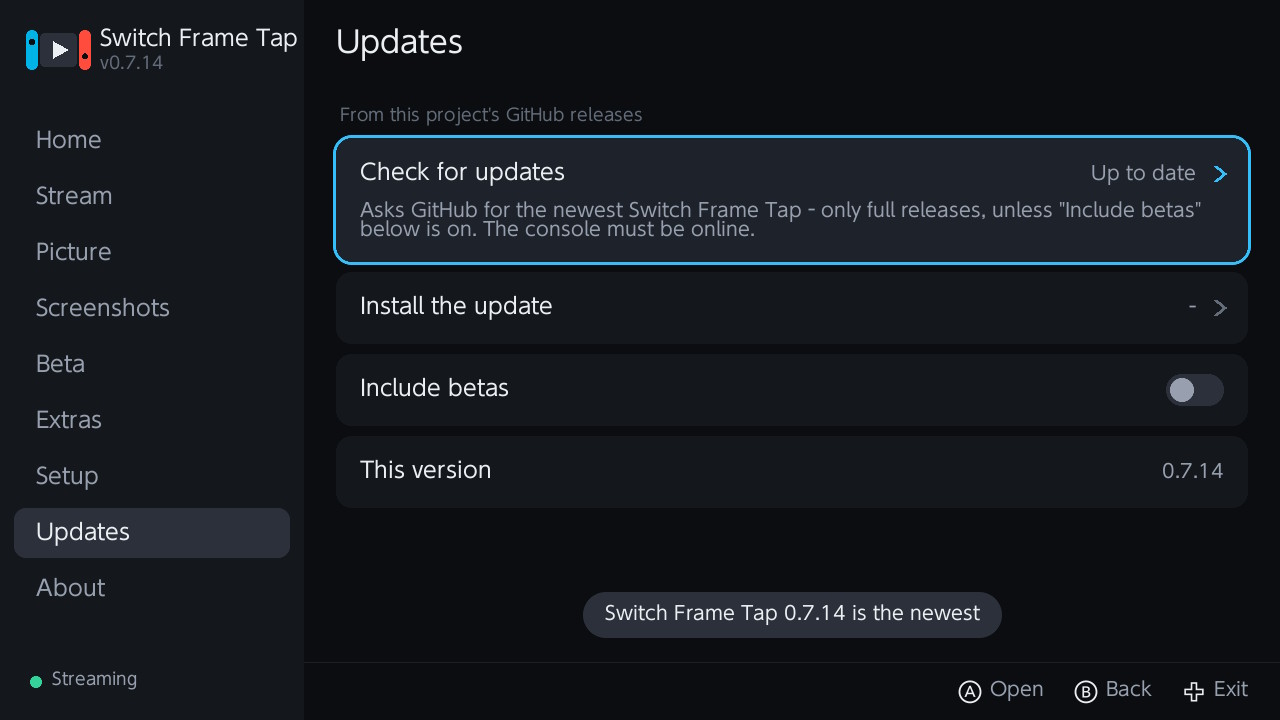
*The Switch app (v0.7.14): Home with the stream's state, the Updates page, an
update being installed, and the overlay over a game - captured on the console.*
**Switch Frame Tap** in the homebrew menu, one page per topic in the sidebar
(L and R change pages): **Home** (what the stream is doing and its frame rate,
streaming on/off, start with the console), **Stream** (the connection - USB
viewer, webcam or network - game audio, sound in no-record games, screen off),
**Picture** (quality, keyframes, maximum resolution), **Screenshots**, **Beta**
(the HOME menu and the overlays in the stream), **Extras** (below), **Setup**
(the setup check, start delay), **Updates** (below) and **About**. Changes apply
at once - a running stream restarts with them. Settings live in
`sdmc:/config/switch-frame-tap/config.ini`.
### Get extras
The optional tools, installed from the manager app with the Switch online:
**Ultrahand Overlay** (the overlay menu, with nx-ovlloader), **SaltyNX** and
**ReverseNX-RT** (1080p over USB), and an overclock tool for 1080p at 60 fps -
**sys-clk** or **Horizon OC**, one or the other. Each row says whether it is
installed; A twice downloads the latest release from its author's GitHub page
(over HTTPS, checked against the console's own certificates) and unpacks it
onto the SD card, keeping the tool's existing settings files. Tools that run at
boot need a restart. Horizon OC: its authors warn that RAM overclocking can
corrupt the NAND or SD card, an update resets its settings, and with Hekate the
boot entry needs `kip1=atmosphere/kips/hoc.kip` (the manager says when it is
missing).
### Updates
**On the Switch:** the app's **Updates** page. **Check for updates** asks
GitHub for the newest release, **Install the update** downloads its Switch zip
and puts it on the SD card as a manual update would (the sysmodule, the memory
helper, the overlay and the app; your settings are kept, and "Start with the
console" stays as you set it). Restart the console to finish.
**The viewers** (Windows, Linux, macOS, Android) look for a new version when
they open and show **Update to vX** on their home screen; Settings has
**Updates** with a Check button. One click downloads it, replaces the viewer's
files and restarts it (Android asks you to confirm the install). The AppImage
replaces itself. Builds from source update the way they were installed, and the
Flatpak bundle with the next `.flatpak` from the releases page.
**Include betas** (in each app) also offers test versions; off, only full
releases.
### The overlay
Needs an overlay menu (Tesla Menu or Ultrahand, on nx-ovlloader): stream
on/off (remembered across reboots), live status, **Stream this app** (see
below), **Enable sound in no-record games** (below), the **Beta** switches
(the HOME menu and the overlays in the stream, from the next restart; homebrew
in docked mode), and Game default / Handheld (720p) / Docked (1080p) through
ReverseNX-RT.
### Sound in games that block recording
The game's sound comes from the console's own video recorder, and some games
turn it off (Super Smash Bros. Ultimate, for one): the picture streams, the
sound does not. [dvr-patches](https://github.com/exelix11/dvr-patches) (by
exelix11, made for SysDVR, BSD-3) patch the system so the recorder runs for
every game, and then the sound comes through. They come with Switch Frame Tap
(v0.7.4), **off**:
1. In the manager app (or the overlay), turn **Sound in no-record games** on.
2. Restart the console.
It applies to every game while on. If a game crashes with it (a crash report
for `0100000000000023`), turn it off again and restart. The patches are kept
in `config/switch-frame-tap/dvr-patches/`; turned on, they are copied to
`atmosphere/exefs_patches/switch-frame-tap-sound/`. They are tied to the
firmware: a Switch Frame Tap update brings new ones, and the sysmodule
refreshes the copy at boot. dvr-patches installed by hand (in
`atmosphere/exefs_patches/am`) are recognised, and the switch turns them off
too. (Recording the console's final mix through `audrec:u` instead was tried:
it records, but a game that blocks recording is silent in it.)
### Webcam mode
Set **Connection** to one of the two webcams in the manager and restart the
console: the Switch then shows up on the PC as a USB camera, **Switch Frame
Tap Camera**. No viewer and no driver. The camera app picks the size; the
picture is scaled to it.
| Connection | format | sizes | for |
|---|---|---|---|
| **USB - webcam (OBS)** | H.264 | 1920x1080 or 1280x720 at 60 fps | OBS (best quality) |
| **USB - webcam (any app)** | uncompressed NV12 | 1280x720 at 25 fps, or 768x432 at 60 | the Windows Camera app, browsers, Discord, Zoom, Teams - any camera app |
The "any app" camera sends every frame uncompressed straight from the
console's video engine, so nothing on the PC has to decode it (no decoder
delay either); USB 2.0's ~37 MB/s is what limits 720p to 25 fps.
**1080p60 in any app:** use **webcam (OBS)**, add it in OBS as a Video
Capture Device, click **Start Virtual Camera**, and pick **OBS Virtual
Camera** in Discord, Zoom, Teams, the Camera app or the browser. (An
uncompressed 1080p frame is 3.1 MB - about 11 fps over USB 2.0 - so the "any
app" camera stops at 720p.)
- **OBS:** add a **Video Capture Device**, pick Switch Frame Tap Camera, and set
**Buffering** to **Disable**. Latency is higher than with the viewer: OBS's
H.264 camera decoder holds back several frames
([an OBS issue](https://github.com/obsproject/obs-studio/pull/13462), not
the console's). On Linux OBS reads it through v4l2.
- **No sound** in webcam mode: a USB microphone needs isochronous transfers,
which the Switch's USB device service cannot do. Use the viewer for sound.
- **The Windows Camera app does not open the H.264 camera** (it wants
uncompressed or MJPEG cameras): use **webcam (any app)** for it.
- On Linux, `tools/raw-recv/uvc-check` (`make -C tools/raw-recv uvc-check`)
streams either camera for a few seconds and reports frame rate and errors
(`--size 1080|720|432`, `--shot frame.ppm` for the uncompressed one).
- Changing the mode needs a restart (the USB descriptors are set at boot). Set
it back to **PC viewer** the same way.
Measured (Linux, v4l2): H.264 60.0 fps at 1920x1080 and 60.1 fps at
1280x720, 0 decode errors, first frame 0.4-0.8 s after the camera opens; OBS
on Windows works. Uncompressed: 26.0 fps at 1280x720 and 60.0 fps at
768x432, every frame complete, first frame 0.4-1.1 s after opening.
The USB camera side follows Insektaure's
[SysDVR-UVC-Capture](https://github.com/Insektaure/SysDVR-UVC-Capture)
(GPL-2.0), whose research into `usb:ds` control transfers made it possible.
### Network streaming (play docked)
Set **Connection** to **Network** in the manager and restart the Switch; in
the viewer, press **Tab** until it says **Connection: Network** (it is
remembered). With the Switch and the PC on the same network - Wi-Fi, a phone
hotspot or the dock's LAN port - the viewer finds the console by itself: the
address that worked last time, the console's broadcast, or a quick scan of the
network (many Wi-Fi routers drop broadcasts between wireless devices, so the
scan is what finds it there). **I** in the viewer types the Switch's IP by hand
(the manager shows it). One connection at a time: in Network mode the Switch
leaves USB alone.
The stream is **not** the SD-card FTP server a homebrew FTP app exposes (for
example port 5000): those are only for copying files. Switch Frame Tap listens
on **TCP 9950** and beacons on **UDP 9951**. `switch-frame-tap-viewer --check
--net 192.168.1.50` tests that path.
The stream is the same as over USB - sound, recording, the menu - with one
addition: **the quality adapts to the network**. Five times a second the
Switch checks how busy its network sender is; when the link is full it codes
the next frames coarser, and when there is room again it steps back to your
quality setting. Frames never pile up, so the frame rate and the delay stay
steady and the picture gets softer in fast scenes instead.
- Latency is a little above USB (a 1080p frame takes a few ms to cross even a
fast network).
- The network decides the picture: a close hotspot or a LAN adapter in the
dock is best; a far-away or busy home Wi-Fi drops the quality more often.
**Max resolution 720p** halves what the network has to carry.
- Fewer keyframes (v0.7.13): over the network nothing gets lost, so the
Switch sends a keyframe - a big full picture - only every 4 seconds, plus
one right away whenever the viewer needs it (connecting, recording, a
decoder change). On a busy Wi-Fi those big frames used to stall the stream
for a moment every second.
- Windows asks once whether to allow the viewer through the firewall on
private networks - allow it.
- The Android / Android TV app streams this way: put the console and the
Android device on the same network; it finds the Switch by itself, or type
its IP in the app's Settings.
Measured (Run AO, before the rate control): docked 1080p on home Wi-Fi, the
Switch's link carried 20-29 Mbps; a fast race at Medium needed ~40, so frames
queued - 7-30 fps and 100-350 ms of delay. With the rate control on a phone
hotspot: smooth 60 fps, "very playable", latency a little above USB.
### Homebrew
Homebrew apps stream too - forwarders on the HOME menu, the homebrew menu in
title-override mode, and (with **Stream the HOME menu** on, v0.7.14) the
homebrew menu from the Album and the apps started from it - at the resolution
the app draws (usually 1280x720).
ReverseNX-RT cannot switch homebrew to docked mode (it works through the
official SDK, which homebrew does not use); **Homebrew in docked mode** (beta,
v0.7.18) does it for apps started by holding R over a game or from a forwarder,
and apps that pick their resolution from the mode then draw 1080p. Some apps refuse to run while a debugger is attached - the
stream reads frames that way - such as TiCo's protected builds: turn **Stream
this app** off in the overlay while one is running and restart it; the
sysmodule then never touches it (no stream, no screenshots). The manager's
**Apps never streamed** clears the list.
### Screenshots
Turn on **Screenshot button** in the manager and press **L3 + R3** (or another
combo you pick there) in any game: the frame is saved as a PNG at the game's
own resolution - 1920x1080 docked or with ReverseNX-RT, 1280x720 handheld -
in `sdmc:/switch/switch-frame-tap/screenshots/` - or, with **Save to: With
the system's screenshots** (v0.7.11), next to the console's own in the Album
folder - with or without the PC viewer (~0.4 s). A custom combo can include
the Capture button. With Ultrahand installed a notification confirms it. Browse,
view and delete them in the manager (**View screenshots**). The PNGs are
stored uncompressed: exactly the pixels the game drew, ~6 MB at 1080p.
### Logs
`sdmc:/config/switch-frame-tap/log.txt` (rewritten at every boot, capped at
4 MB; the previous boot's is kept as `log.prev.txt`), `last.txt`, a one-line
breadcrumb that survives a forced power-off, and `launcher.txt`, why the
sysmodule did or did not start this boot and which sysmodules use the shared
system memory. Please attach them to a bug report, with any new files in
`atmosphere/crash_reports/`.
## Building from source
```bash
git clone --recursive https://github.com/Atmosphere-NX/Atmosphere ref/Atmosphere
git clone https://github.com/WerWolv/libtesla ref/libtesla
bash tools/make_release.sh VERSION # -> dist/switch-frame-tap-VERSION-{switch.zip,linux.tar.gz,windows-viewer.zip} (macOS, Android, the Linux AppImage and Flatpak bundle: GitHub Actions on the tag)
bash tools/run_pc_tests.sh # every check that needs no console
```
Everything builds in the `devkitpro/devkita64` Docker image (the first build
compiles libstratosphere, ~15 minutes). The PC viewer: `make -C tools/raw-recv`;
the Windows viewer is cross-compiled from Linux with Zig -
`bash tools/raw-recv/build-windows.sh VERSION` (after `build-ffmpeg-min.sh`
once, for FFmpeg built into the exe), toolchain listed in
[`ref/README.md`](ref/README.md). `raw-view --file REC.sft --paced` runs a
recording through the live pipeline (no console needed);
`raw-view --update-check` asks GitHub as the viewer's updater does. The
Android app builds with Gradle in `android-tv/` (CI:
`.github/workflows/viewer-android.yml`). `bash tools/manager-preview/run.sh`
draws the Switch app's screens on a PC, as PNGs.
**Test installs.** With `sdmc:/applet-mitm.armed` on the card the sysmodule
ignores `config.ini` and reads its flags from that file instead
(`vic exec dbg usb nvgop=60 live wait=20` is the release behaviour), logging
to `sdmc:/applet-mitm.log` - how every development run was done.
## Limitations
- **USB is handheld only** (docked, the dock owns the USB-C port); docked play
streams over the network (v0.7.0), where the picture quality depends on the
network. One viewer at a time, and one connection (USB or network) per boot.
- **1080p60 wants CPU 1785 MHz.** The frame copy runs on the CPU; at the stock
1020 MHz it is slower and 1080p runs a little below 60 (still playable).
- **Homebrew:** apps that run as applets (the homebrew menu from the Album)
stream only with **Stream the HOME menu** on - otherwise use a forwarder or
title override. Apps with anti-debug protection (TiCo) cannot be streamed;
exclude them. Docked mode for homebrew (beta) works in title override and
from forwarders, not from the Album (too little memory there for 1080p).
- **The HOME menu** (opt-in): no sound outside games yet (the console's
recorder only records games); a game's manual still pauses the stream.
- **The overlays** (opt-in): copied 10-20 times a second, so they move a
little less smoothly than the game; the power menu is copied at half
resolution and the overlays look a bit soft at 1080p. Only the system's
overlays and Tesla / Ultrahand menus are picked up.
- **A handful of games tested:** Mario Kart 8 Deluxe, Zelda: Breath of the
Wild, Ocarina of Time (Nintendo Switch Online), Kirby and the Forgotten Land
and several homebrew apps. Others should work if their swapchain is
block-linear RGBA or BGRA, at most 1920x1088 and 10.5 MB a buffer; the log
says so if not. Games that draw upside down and have the system flip the
picture (Kirby: v0.4.1) are flipped back the same way; a 90-degree rotation
is not handled (none seen yet - the log would say "rot-90").
- **Game audio** comes from the console's own video recorder (as with SysDVR):
games that turn video capture off have no sound in the stream unless
[Sound in no-record games](#sound-in-games-that-block-recording) is on.
- **Webcam mode:** picture only; the H.264 camera has higher latency in OBS
than the viewer, the uncompressed one tops out at 720p25 (USB 2.0);
switching modes needs a restart.
- **Viewers: Windows, Linux (x86_64), macOS 12+ and Android 6+.** On Windows
the driver needs Zadig once, as with SysDVR. Android plays the network
stream (and USB on devices that can host it).
- **Cheats:** the stream reads the game directly, like a debugger. When
Atmosphère's cheat engine already holds the game (cheats loaded for it),
it reads through the cheat engine instead (since v0.7.9, by Laliukz):
cheats and streaming work together, but reads are about 5x slower, so a
1080p60 game can drop to 20-25 fps while cheats are loaded. Games without
cheats are not affected.
- **Occasional micro-stutters** during loading and heavy scenes: reads,
the VIC and NVENC are shared with the whole system (NVENC also with the
console's own background recording), and a frame can take 50-200 ms then.
- **Over USB the bitrate follows the quality setting, uncapped.** v0.6.0 made
P frames about 15-20% smaller (QP +2 on P frames, a better motion search);
at the same quality x264 needs ~89% of the console's bits, so what remains
is the price of "High" (near-lossless) at 1080p60, which USB has room for.
Over the network the quality adapts to the link (v0.7.0).
- **Game manuals, news and the eShop** (the browser applets) need nearly all
of the console's applet memory. Since v0.7.10 Switch Frame Tap holds none
of it while you are not streaming, and when a game opens its manual or
news while you stream, the stream pauses first and comes back when you
close it. Since v0.7.11, pressing **HOME** while streaming ends the stream
and gives its memory back (it comes back when the game is on screen
again), so they also open from the HOME menu; since v0.7.14 the eShop
opens from the HOME menu while the HOME menu streams too.
- **Few consoles tested.** The author's Mariko (firmware 22.5.0, Atmosphère
1.11.2), plus users' reports: a Switch Lite on 23.0.0 (Atmosphère 1.12.0),
23.0.1, 22.0.0 and 21.0.1.
## If something goes wrong
Turn off **Start with the console** in the manager and reboot; or delete
`atmosphere/contents/0100000000000C20/` and `0100000000000C21/` from the SD
card on a PC; or boot
holding **Volume Up**, which makes Atmosphère skip `contents` sysmodules.
Nothing here touches NAND or the bootloader. Keep a NAND backup anyway.
**USB: the viewer waits, and the log says "host did NOT configure us".**
The PC never set up the Switch's port - most often a USB-C to USB-C cable,
which can make the Switch the host. Use a USB-C to USB-A cable into a USB-A
port ([#22](https://github.com/TomasUribe/switch-frame-tap/issues/22)).
**Network: "connection refused".** The Switch is set to USB. Set
**Connection** to **Network** in the manager or the overlay and restart the
console - the connection is chosen once per boot ([#24](https://github.com/TomasUribe/switch-frame-tap/issues/24)).
Read the SD card through a card reader or Hekate's USB mass storage, **not
MTP**: MTP returns I/O errors on a log whose tail was cut by a forced
power-off. The previous boot's log is kept as `log.prev.txt`, so the boot
that went wrong survives one reboot.
## How this was built — with an AI, openly
I built this together with **Claude** (Anthropic's AI model, through Claude
Code). That should change how you read and trust what's here.
- **Claude** wrote nearly all of the code and the documentation, did the
source-reading (Atmosphère and its kernel mesosphere, NVIDIA's open headers,
switchbrew, reference drivers), designed each hardware probe, and
interpreted the logs that came back.
- **I** set the goal and the direction, ran every one of the more than 180
hardware test runs on my own console, read the logs back off the SD card, decided which
routes to keep pushing and when to drop one, and decided what to publish.
What that means for you:
- **"Verified on hardware" means exactly that**: a real run on a real console,
with the log, committed under [`logs/`](logs). Conclusions drawn from reading
source rather than running it are labelled as such.
- **The AI got things wrong, and some mistakes were not cheap**: bugs that froze
the console, one that fataled another sysmodule at boot, a timing figure
(a "119 ms" VIC blit that was really SD-card logging) published before it
was checked, and an early NVENC result over-read. Every one is recorded in
[`tier4/mitm/STATUS.md`](tier4/mitm/STATUS.md), corrections left in place.
- **The history shows it.** Most commits carry a `Co-Authored-By: Claude`
trailer.
Review it as you would a contribution from someone you haven't worked with
before, which is good advice for homebrew that drives hardware engines anyway.
---
## The research
The full log, newest first, with every dead end and its evidence, is
[`tier4/mitm/STATUS.md`](tier4/mitm/STATUS.md). The map for picking the
project up is [`tier4/mitm/PROJECT-HANDOFF.md`](tier4/mitm/PROJECT-HANDOFF.md);
the early narrative is [`tier4/mitm/WRITEUP.md`](tier4/mitm/WRITEUP.md). The
highlights:
### Getting the pixels: three routes closed, one open
A sysmodule can process frames at full speed; getting hold of one is the
problem. Three routes through the graphics stack were each taken to a definite
verdict:
| route | verdict |
|---|---|
| Import the game's swapchain `nvmap` handle (`FROM_ID` + `MAP_CMD_BUFFER`) | Pins to `phys=0`, silently, whatever the flags, permission mask or aruid. **Structural:** nvservices maps client memory through the handle of the process that initialised it, and the game's pages are in the game's process. |
| `vi` indirect layers (`GetIndirectLayerImageMap`) | `0x60A`. The object graph builds and the layer stays empty: attaching an application's layer to an indirect layer is AM's job. |
| Read back the display controller | No such ioctl in nvdrv. |
The route that works goes around the graphics stack: `svcDebugActiveProcess`
+ `svcReadDebugProcessMemory`, with `"force_debug": true` in the NPDM (as
`creport` and `dmnt.gen2` declare). mesosphere's permission check ignores the
`DeviceShared` attribute that sank the nvmap route (`kern_k_page_table_base.cpp`),
and a whole 1080p slot reads in ~5 ms. Two things are needed to stay attached
without hurting the game:
- **A debug event pump.** While attached, every thread start or exit in the
game suspends *all* its threads until the debugger continues
(`KDebugBase::ProcessDebugEvent`). Loading screens start threads; the first
stream froze on one. `applet_mitm_dbgpump.cpp` does what dmnt's cheat engine
does: block on the debug handle, drain, continue - on the new thread's core.
- **Never hold the game's graphics resources.** Importing the game's buffer
handle or adopting its aruid in our nvdrv session kept an exited game's
memory alive, and the next launch hung on a black screen. Live mode uses
only its own buffers.
### Reading a finished frame
The mitm sees `queueBuffer` when the game *submits* a frame, and the GPU is
often still drawing it: queueBuffer carries an acquire fence, which the
compositor waits on. Reading early produced torn frames and whole frames from
two or three presents back. The capture now snapshots the slot and its fence
together (a seqlock against the binder thread), waits for the fence (measured:
5.5 ms average in MK8D, 7.5-11 ms in BOTW), then reads. `tools/sft_tool.py
artifacts` counts both artifacts in a recording: 29 stale / 22 torn per 3000
frames before, 0 / 0 after.
### Driving the Tegra engines from a sysmodule
- **VIC** over raw nvdrv, byte-exact: `SETCL` is mandatory (nvservices, unlike
the Linux DRM driver, does not set the class), relocs are inert on Horizon
(pin with `MAP_CMD_BUFFER` and inline the address), the syncpoint increment
must be in the command stream, and a zero address hangs the VIC and with it
the compositor.
- **The VIC's colour matrix, solved.** Three attempts produced a flat picture;
an 11-probe sweep gave an exact law (`out = sum(K * in) * 2^-(8 + shift) +
offset`, [`tools/vic_csc.py`](tools/vic_csc.py)) that reproduces all 528
measured values. The stream uses real BT.709 limited range.
- **Block-height units differ:** the VIC's is log2 of GOBs; NVENC's
`block_height` value 2 means 16 rows. Mismatched, the encode came out
perfectly scrambled.
- **NVENC was never "unbooted firmware" - it was unclocked.** On Horizon a
client requests the engine's clock from `mm:u` before using it (as averne's
FFmpeg nvtegra code does); an unclocked engine accepts a job and never runs
it. With the clock up, the job the system's own recorder (grc) builds,
captured from grc and replayed from our own channel, encodes correctly;
constant QP works through RCMODE 0; `error_status` 2 is routine (grc's own
frames carry it). P frames use grc's P setup and job with the references
ping-ponging; the drift test (last frame of a 59-P-frame chain against the
console's own picture) passes at 42 dB.
*The last frame of a 30-frame IDR + P chain encoded on the console (Run K),
decoded on the PC: 42 dB against the console's own picture of it.*
### The transport
**The network (v0.7.0).** `bsd:u` from a sysmodule, with a static 440 KB
transfer-memory block as SysDVR's sysmodule does (libnx's default wants MB a
sysmodule does not have); TCP on port 9950, one viewer; a UDP beacon on 9951.
Frames go out from their own thread, so the network never stalls the capture;
the QP follows how busy that thread is.
USB 2.0 bulk through `usb:ds` saturates at ~37 MB/s from this module (measured
across five resolutions), which is why raw pixels stopped at 768x432 and the
stream is H.264. Transfers that time out are cancelled, so a newly opened
viewer never starts mid-frame. SuperSpeed descriptors (including the BOS
`usbDsSetBinaryObjectStore` needs) are accepted but the link still trains to
High Speed on the cable tested.
### Pieces you might want on their own
- **Non-domain mitm sub-object forwarding for libstratosphere**
([`tier4/applet-mitm/patch_libstrat.py`](tier4/applet-mitm/patch_libstrat.py),
55 lines): Atmosphère's mitm framework forwards undeclared commands only on
domain sessions; `vi:u` hands out its sub-objects on non-domain ones. If you
have tried to mitm `vi` and given up, this is the missing piece.
- **A transparent `vi:u` mitm** that recovers every frame's layout from the
binder traffic (`setPreallocatedBuffer`, `queueBuffer` with its fence), and
handles both `GetDisplayService` and `GetDisplayServiceWithProxyNameExchange`
(command 1, used by BOTW: its request is forwarded byte for byte).
- **Undocumented `vi` ABIs:** `CreateIndirectLayer` (2050),
`CreateIndirectProducerEndPoint` (2052), `CreateIndirectConsumerEndPoint`
(2054), all `{u64, u64} -> u64`; `GetDisplayService`'s command id is the
service type (`vi:u` 0, `vi:s` 1, `vi:m` 2).
- **A dmnt-style debug event pump** for any sysmodule that stays attached to a
game.
- **PC tools with self-tests** (`bash tools/run_pc_tests.sh`): the viewer,
`sft_tool.py` (recording stats, drift test, artifact detector), the VIC matrix
model, NVENC setup decoders.
Earlier captures, kept for the record: the game's swapchain read out at native
1080p and de-swizzled on the PC ([`docs/frame-1080p.png`](docs/frame-1080p.png)),
and the raw 768x432 "packed 4:2:0" stream that preceded H.264
([`docs/frame-stream-packed420.png`](docs/frame-stream-packed420.png)).
## The road to 1080p60
The goal is the game's native docked output, **1920x1080 at 60 fps**, streamed
to a PC. **Reached over USB (M96, Run W):** 58.4 fps over a session against the
game's 59.2, 59.5-59.9 fps per 20 s window once running, 0 lost or undecodable
frames in 9,090. How it got there:
1. **A 1080p NVENC setup** (M90-M92). The system's own recorder only builds
720p jobs, so the 1080p setup was derived from grc's 720p one
(`tools/nvenc_replay.py`). 1920x1080 stalls the engine; **1920x1088** (whole
macroblock rows) encodes, and the SPS crops the picture to 1080.
2. **1080p over USB** (M93). ReverseNX-RT makes the game render its docked
picture in handheld, where the USB port is free; the stream detects the size
change and restarts at 1080p by itself.
3. **The frame budget** (M94-M96). A 1080p frame is an 8.3 MB copy out of the
game (~8.5 ms at CPU 1785 MHz), a 1.7 ms VIC conversion and a 5.6 ms encode.
The encode now runs while the next frame is read (M94), and the capture
takes the newest frame the GPU has *finished* instead of the newest one
queued (M96: waiting on the latest queued frame skipped 20% of frames; now
1.6%).
What is left: **stock clocks** (1080p60 at CPU 1020 MHz). Streaming from the
dock works over the network since v0.7.0, with the quality adapting to the link.
## Roadmap
| stage | state |
|---|---|
| Capture the game's frames (`vi:u` mitm + debug SVCs) | **done, on hardware** |
| VIC conversion to BT.709 NV12 | **done, on hardware** |
| NVENC H.264, IDR + P frames | **done, on hardware**; no drift over 59-frame chains |
| USB transport + live PC viewer with latency readout | **done, on hardware** |
| Live mode: viewer and game come and go | **done, on hardware** (M86-M86b) |
| Games beyond MK8D (per-game swapchain geometry, `vi:u` command 1) | **done for BOTW** (M87); others untested |
| Frame-exact capture (GPU fence, slot+fence snapshot) | **done, on hardware** (M88-M89): 0 stale, 0 torn |
| **1080p60 over USB** (1920x1088 NVENC setup, pipelined encode, finished-frame capture) | **done, on hardware** (M90-M96): 58.4 fps sent vs the game's 59.2, with ReverseNX-RT in handheld and CPU 1785 MHz |
| 1080p60 at stock clocks (CPU 1020 MHz) | tested (Run X): works, a little below 60 |
| **Releases**: v0.1.0 (config file, manager app, overlay, native screenshots); v0.1.1 (homebrew) | **done, on hardware** (M97-v0.1.1) |
| Homebrew apps (forwarders and title override: a `vi:m` mitm for the running application only; larger and offset swapchains, BGRA, 1080p for any layout; a never-attach list) | **done, on hardware** (v0.1.1) |
| Bitrate tuning (better P frames, QP) | **done** (v0.6.0): P frames at QP+2 and the temporal motion hint, ~15-20 % smaller; the encoder measured against x264 (89 % of our bits at the same QP) |
| **Network streaming, docked play** (TCP from the sysmodule, discovery by last address / beacon / subnet scan, rate control from the sender's busy time) | **done, on hardware** (v0.7.0) |
| Games with one buffer object per slot (Minecraft, Smash: found by watching which buffer changes with which frame), finished frames only (Pokemon's fades), the on-screen keyboard with the module on | **done, on hardware** (v0.7.1) |
| Frame buffers matched while streaming - no wait, still screens, homebrew whose buffers sit in larger blocks (Moonlight, DuckStation), games with two lookalike memory pools (Sonic Frontiers); the 720p/1080p switch when the old docked picture stays around the new one | **done, on hardware** (v0.7.3, much of it [WillMidia's PR #4](https://github.com/TomasUribe/switch-frame-tap/pull/4)) |
| Game audio (grc:d PCM alongside the video; paced playback) | **done** (v0.3.0); games that block recording with dvr-patches, switchable from the overlay (v0.7.2) |
| Stats overlay in the viewer (FPS / graphs / full) | **done** (v0.7.2) |
| The optional tools installed from the manager (Ultrahand, SaltyNX, ReverseNX-RT, sys-clk or Horizon OC) | **done, on hardware** (v0.7.5) |
| Windows viewer, and paced display (reader / decoder / vsync threads) on both | **done** (v0.2.0) |
| Recording from the viewer (MP4: the console's H.264 untouched + AAC) | **done, on hardware** (v0.5.0) |
| Webcam mode (UVC 1.5 H.264 camera, 1080p/720p60) | **done, on hardware** (v0.4.0) |
| Webcam for any camera app (uncompressed NV12, 720p25 / 432p60) | **done, on hardware** (v0.7.7) |
| Firmware 23 (built against Atmosphère 1.12); macOS viewer; Linux viewer for any distribution | **done** (v0.7.11; 23.0.0 and macOS confirmed by users) |
| HOME menu while streaming (browser applets get their memory back), USB released while streaming is off | **done, on hardware** (v0.7.11) |
| Viewer: one-thread low-delay decode, vsync toggle, GPU upscaling (FSR 1, NIS, RTX VSR on Windows) | **done, on hardware** (v0.7.11) |
| Hardware decode in the viewer (VAAPI/NVDEC on Linux, D3D11VA on Windows; VideoToolbox on macOS, off by default there) | **done, on hardware** (v0.7.12; Windows v0.7.13) |
| USB 3.0 lossless (handheld) | parked: the link still trains to High Speed |
| The HOME menu and the system screens (System Settings, the user picker, the Album, the homebrew menu) | **done, on hardware** (v0.7.14, opt-in: **Stream the HOME menu** on the Beta page; no sound there yet) |
| System overlays (the volume bar, quick settings, the power menu) and Tesla/Ultrahand in the stream | **done, on hardware** (v0.7.14, opt-in: **Stream the overlays** on the Beta page; copied 10-20 times a second, the power menu at half resolution) |
| Android / Android TV viewer (didix16's PR #17), the PC viewer's look | **done** (v0.7.14) |
| A new Switch app (pages, the stream's state at a glance) | **done, on hardware** (v0.7.14) |
| Updates from the apps (the Switch app, the PC viewers, Android), betas optional | **done** (v0.7.14; the Switch app and the Linux viewer verified end to end) |
| Sound outside games (the HOME menu) | researched: the console mixes it on its audio DSP, out of reach so far |
## Layout
| path | what |
|---|---|
| `tier4/applet-mitm/` | The sysmodule: `vi:u` / `vi:m` mitm, binder intercept, debug-SVC capture and event pump, VIC and NVENC over raw nvdrv, USB (the viewer's bulk transport, or a UVC camera) or the network (TCP, `applet_mitm_net.cpp`), game audio (grc:d), screenshots, the `sftap` control service. |
| `tier4/donor/` | `sft-donor` (v0.7.10), the memory donor: started by the sysmodule only while a viewer is connected, it lends the streaming memory from the applet pool and gives it back when streaming stops, so the console's browser applets (manuals, news, eShop) keep their memory. |
| `tools/raw-recv/` | `raw-view`, the PC viewer (Linux; Windows via `build-windows.sh`, macOS via `build-macos.sh`, the portable Linux build via `build-linux-portable.sh`), `update.h` (it updates itself), and `install-launcher.sh`, its Linux desktop app; `record.h` (MP4 recording) and `menu.h` (the main screen, with a built-in DejaVu font from `gen_font.py`); `uvc-check`, the webcam-mode tester; `mp4-check`, `mp4-frames` and `h264-stats` (checking a recording, frames for the docs, the encoder's efficiency: frame sizes, coded QP, motion vectors) (and `raw-recv`, the raw-frame receiver it grew out of). |
| `manager/` | The Switch app for the homebrew menu (SDL2; `ui.hpp` its look): settings, status, setup check, screenshot gallery, Get extras, updates. |
| `overlay/` | The Tesla/Ultrahand overlay: stream on/off, status, the beta switches, handheld/docked through ReverseNX-RT. |
| `android-tv/` | The Android / Android TV viewer (didix16), Java, built by CI. |
| `common/` | Shared by the Switch side and the viewers: `config.ini` access, the sound patches switch, the version order the updaters use (`sft_version.h`). |
| `flatpak/` | The Flatpak manifest for the Linux viewer. |
| `tools/` | `make_release.sh` (the release zip), `manager-preview/` (the Switch app's screens on a PC), and PC-side analysis and self-tests: `sft_tool.py`, `nvframe_check.py`, `nvp_check.py`, `vic_csc.py`, `nvenc_replay.py`, `nvrec.py`. |
| `tier4/mitm/` | `STATUS.md` (the research log), `PROJECT-HANDOFF.md` (the map), `WRITEUP.md`. |
| `logs/` | The hardware runs' logs and checked outputs. |
| `docs/` | Images and the stream clip. |
| `tier4/recon/`, `tier4/stream-oc/`, `switch-stream/` | Early side projects: a diagnostic sysmodule, an overclock companion, a first streamer attempt. Historical. |
| `ref/` | Not committed: third-party reference trees, see [`ref/README.md`](ref/README.md). |
## Contact
Questions, corrections, or if you want to take a piece of this further - I'd
genuinely like to hear about it.
- **Email:** Some_Potato_1@protonmail.com
- **Reddit:** [u/Papux200](https://www.reddit.com/user/Papux200)
- **Issues:** [GitHub issues](https://github.com/TomasUribe/switch-frame-tap/issues)
- **Forum:** [the GBAtemp release thread](https://gbatemp.net/threads/release-switch-frame-tap-stream-switch-games-to-your-pc-over-usb-at-native-1080p-60fps-no-capture-card.684843/)
(and [the development thread](https://gbatemp.net/threads/im-trying-to-build-a-native-res-capture-program-that-streams-1080p-60hz-video-to-any-pc-through-usb-this-is-my-progress-so-far.684344/) before it)
[](https://www.buymeacoffee.com/papux200)
Forks are welcome and no permission is needed.
## Thanks
- **[WillMidia](https://github.com/WillMidia)** (PR #4): the slot matcher that
finds a game's frame buffers while it streams, homebrew swapchains in larger
memory blocks, the debug-event fix that kept games frozen for seconds, real
crashes reaching the game's own handler, and the encoder-wait fix.
- **[exelix11](https://github.com/exelix11)**: SysDVR, whose socket setup the
network mode follows, and dvr-patches, which bring sound to games that block
recording.
- **[Laliukz](https://github.com/Laliukz)** (PR #8): streaming while
Atmosphère's cheat engine holds the game, through `dmnt:cht`.
- **[didix16](https://github.com/didix16)** (PR #17): the Android / Android TV
viewer.
- **[bshurikan](https://github.com/bshurikan)** (PRs #18, #19): the Windows
viewer's borderless window and responsive settings, and a picture right away
when a network viewer joins mid-game.
- **[DiM3NT0R](https://github.com/DiM3NT0R)** (PR #14) and **proconsule54**:
the first macOS builds, and FSR 1 on Metal.
- **[Insektaure](https://github.com/Insektaure)**: SysDVR-UVC-Capture, whose
`usb:ds` research made webcam mode possible.
## License
GPL-2.0. `tier4/applet-mitm` links libstratosphere and ships a patch against
it, so it is a derivative of Atmosphère and could not be anything else. See
[LICENSE](LICENSE) and [NOTICE](NOTICE).